Using sources
Prerequisites
Centreon CLAPI being a module, it is obviously required to have Centreon installed first. Otherwise, refer to the Centreon installation guide.
Download the latest package of Centreon CLAPI from the website: http://www.centreon.com/Content-Download/download-centreon-clapi.
Shell Installation
Extract the Centreon CLAPI package:
tar zxf centreon-clapi-1.x.x.tar.gz
Change directory:
cd centreon-clapi-1.x.x
Run the installation script:
./install.sh -i
There is not much to do here besides specifying the Centreon configuration directory.:
###############################################################################
#                                                                             #
#              Module : Centreon CLAPI version 1.4                            #
#                                                                             #
###############################################################################
------------------------------------------------------------------------
      Checking all needed binaries
------------------------------------------------------------------------
rm                                                         OK
cp                                                         OK
mv                                                         OK
/bin/chmod                                                 OK
/bin/chown                                                 OK
echo                                                       OK
more                                                       OK
mkdir                                                      OK
find                                                       OK
/bin/grep                                                  OK
/bin/cat                                                   OK
/bin/sed                                                   OK

------------------------------------------------------------------------
      Load parameters
------------------------------------------------------------------------
Please specify the directory that contains "instCentWeb.conf"
> /etc/centreon/

------------------------------------------------------------------------
      Centreon CLAPI Module Installation
------------------------------------------------------------------------
Replacing macros                                           OK
Setting right                                              OK
Setting owner/group                                        OK
Create module directory                                    OK
Copying module                                             OK
Delete temp install directory                              OK

The centreon-clapi.1.4 installation is finished            OK
See README and the log file for more details.
###############################################################################
#                                                                             #
#      Please go to the URL : http://your-server/centreon/                    #
#                     to finish the setup                                     #
#                                                                             #
#                                                                             #
###############################################################################
Web Installation
In order to finish the installation, connect to your Centreon web interface, then go to Administration > Modules and click on the Installation button:

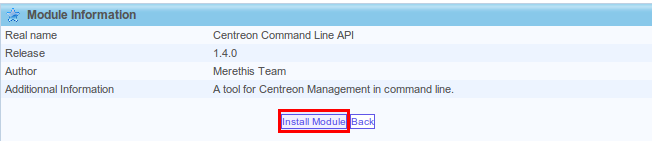
The module is now installed.